 Radiant Games
BO1 Zombies · Desktop browser · Original map links
Black Ops Browser: Where to Play BO1 Zombies
Looking for a Black Ops browser game? Open the BO1 Zombies project at vel.gg. Its map selector lists ten maps, including Kino der Toten, Five and Moon. Choose a map on a desktop computer, let its resources load, then use the start prompt.
Which maps are in the Black Ops browser project?
The original selector has ten map destinations. Use the links below to open a particular map, or use the main selector to choose one and see its description.
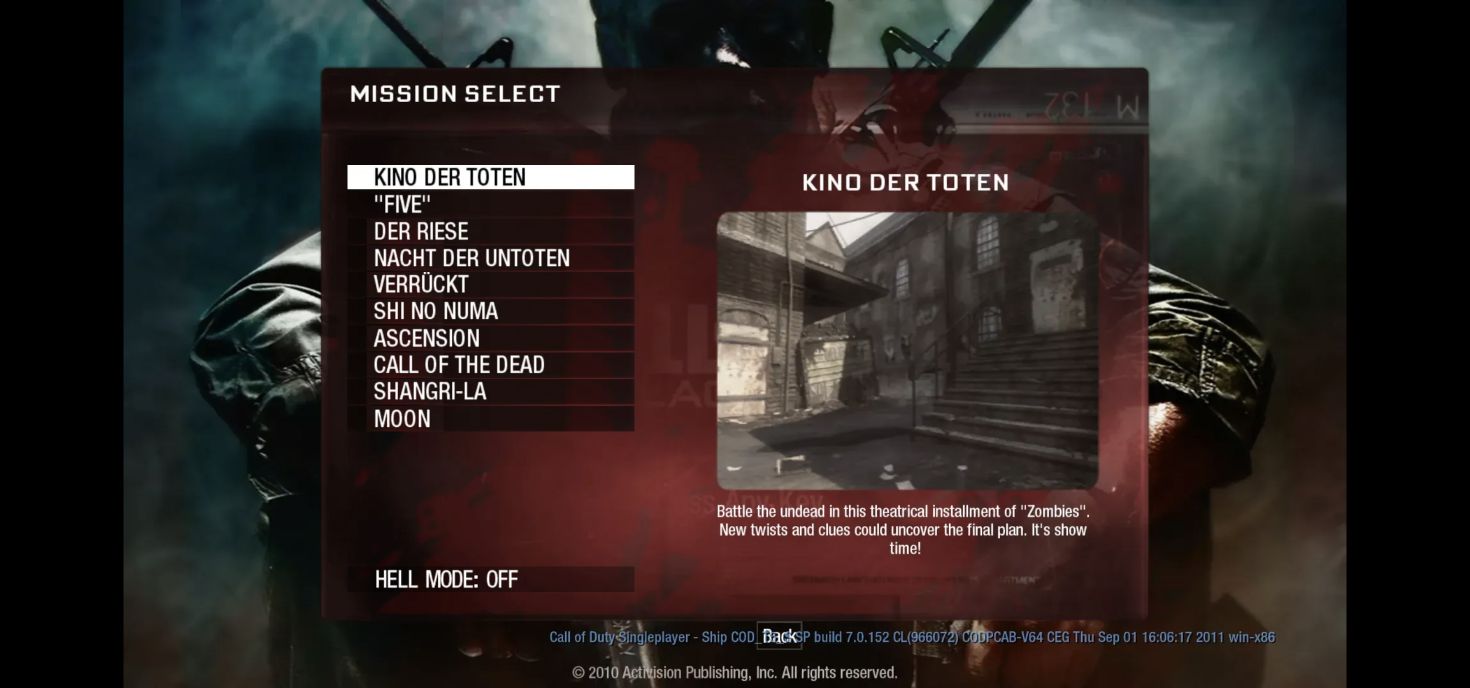
This is a Zombies map collection. For the campaign or competitive multiplayer, check the original Black Ops game’s own editions and platforms. The separate Kino and Moon entries in our directory are other community destinations, distinct from these vel.gg map links.
Can I play BO1 Zombies without installing the PC game?
The vel.gg launcher runs through a website rather than a separate desktop game client. Its loading flow fetches map and engine resources from the source host; it does not begin with a local game-file import.
There is still a download. The browser transfers resources and stores them locally. A first visit can take longer than a return visit with cached data, and each map has its own resources. Loading time depends on the connection, map and existing cache, so follow the on-screen progress.
Open the original HTTPS page directly. The game runs on vel.gg; this directory provides the links and guidance. You do not need the Radiant Optimizer Windows application to follow them.
How do I start the BO1 Zombies browser project?
- Open the map selector. Use a desktop browser with a keyboard and mouse, then choose Kino, Five, Moon or another map.
- Start loading. Selecting a map can begin its download automatically. A direct map link may first show a key prompt to begin.
- Wait for resources and the engine. Keep the tab open. A map image can appear before initialization has finished; wait for the final start prompt.
- Click to start. This gesture requests mouse capture and activates game audio. Interact with the source tab directly.
- Set up input. Once the game opens, use its controls and settings menu to check movement and action bindings before starting a longer session.
The launcher offers mouse sensitivity, volume and fullscreen options. Fullscreen is optional and depends on the browser. Escape opens the pause flow; where keyboard lock is active, holding Escape leaves fullscreen. If the cursor is released, return to the visible resume control to re-enter the game.
Keep the source tab open during the download. Closing it interrupts the current session; clearing its site data can remove retained resources and require another download. Launcher behavior is documented in the startup script.
Does it work on phones, Macs or Chromebooks?
The current launcher requires a desktop with keyboard and mouse. Its capability check rejects phones and iPads, and recommends current desktop Chrome, Edge or Firefox. A phone’s desktop-site option does not add the required input or browser features.
For a Mac or Chromebook, check the browser and hardware rather than relying on the operating-system name. The launcher needs supported graphics, shared memory, browser storage and WebAssembly features. It checks these before the engine starts and reports the missing feature when it cannot proceed.
The source specifies a 1.5 GiB game heap, plus room for graphics and sound. This is the engine’s allocation, rather than a total system-RAM recommendation. Other tabs and applications also consume memory.
Use the original HTTPS host so its cross-origin isolation headers can enable shared memory. Allow storage for the source site and keep enough free space for the selected map. WebGL 2 and the required graphics extensions must be available. See the project’s browser requirements for the exact feature checks.
What is Hell Mode in BO1 Zombies?
The selector’s Hell Mode switch describes a run starting at round 100, with up to 300 zombies at once and no perk machines.
The current configuration enables it for Kino, Five, Der Riese, Nacht, Verrückt and Shi No Numa. Ascension, Call of the Dead, Shangri-La and Moon do not have that switch enabled. Leave it off for the ordinary map launch; the selector indicates when the option is unavailable. These settings come from the map configuration.
Why is Black Ops browser not loading?
Use the message on the source page to choose the next step. A graphics error, interrupted download and mouse-capture prompt happen at different stages.
- Shared memory is unavailable
- Open the original HTTPS link directly. Shared memory also depends on the source host’s cross-origin isolation headers; embedding the game in another page does not supply them automatically.
- Unsupported browser or a missing feature
- Update the desktop browser and read the feature named in the message. The launcher checks WebAssembly, workers, audio and file storage. A page loading successfully does not mean its engine has all required features.
- Unsupported graphics
- Check graphics acceleration and current graphics drivers, following the source page’s instructions. WebGL 2 alone may not cover every graphics extension the engine needs.
- Not enough storage or storage disabled
- Allow site storage and check available space. Removing the game host’s data also removes cached resources, so avoid clearing it as the first response to a slow download.
- Download interrupted
- Keep the tab open and use the source host’s resume or retry control when offered. Read whether the download is progressing before restarting the entire flow.
- Mouse or sound access was declined
- Click the final start control in the original tab. If the same message returns, note its exact wording and browser version; finishing the resource download is a separate stage from activating input and sound.
For a memory error, the host suggests closing other tabs and applications and retrying in a 64-bit desktop browser. If play is slow after launch, compare a normal map session with other heavy tabs closed. Loading progress and gameplay frame rate describe different stages. Error messages and recovery controls are defined in the launch script.
More questions about this COD Zombies browser game
Can I play BO1 Zombies with friends?
The published launcher is a solo Zombies map selector. It does not present a friend-invite or multiplayer lobby flow. If co-op is essential, check the current host for a lobby or invite option before arranging a session.
Is this an official Black Ops release?
This Black Ops Zombies browser game is a community-hosted project. Radiant Games is an independent directory and does not claim affiliation with Activision, Treyarch or vel.gg.
Does the browser keep my progress?
The launcher retains some preferences and downloaded resources. That cache describes what the browser has downloaded; it does not by itself show that a previous Zombies run can be resumed or transferred to another device. Look for a dedicated save or resume feature in the game.
Can I use cached files if the website disappears?
Retained resources can help a later visit load, but the launcher still comes from the source host. Browser cache and archived pages are not a dependable substitute for a supported offline version.
For the current Black Ops browser entry, open the original map selector and choose your map. To find Halo, Quake or other projects, return to the Radiant Optimizer browser game list.